QSO Fieldbook CAT Control for the Yaesu FT-891
QSO Fieldbook CAT control is something I’ve wanted to experiment with for a while, and over the last couple of days I finally decided to see how far I could take it. It started with a pretty simple question: could I plug my Yaesu FT-891 into my tablet over USB and have QSO Fieldbook automatically read the frequency?
The answer, after quite a bit of trial and error, is yes.
And it ended up becoming a lot more capable than just reading the frequency.
QSO Fieldbook CAT Control Now Works With the FT-891
The first radio supported by QSO Fieldbook is the Yaesu FT-891.
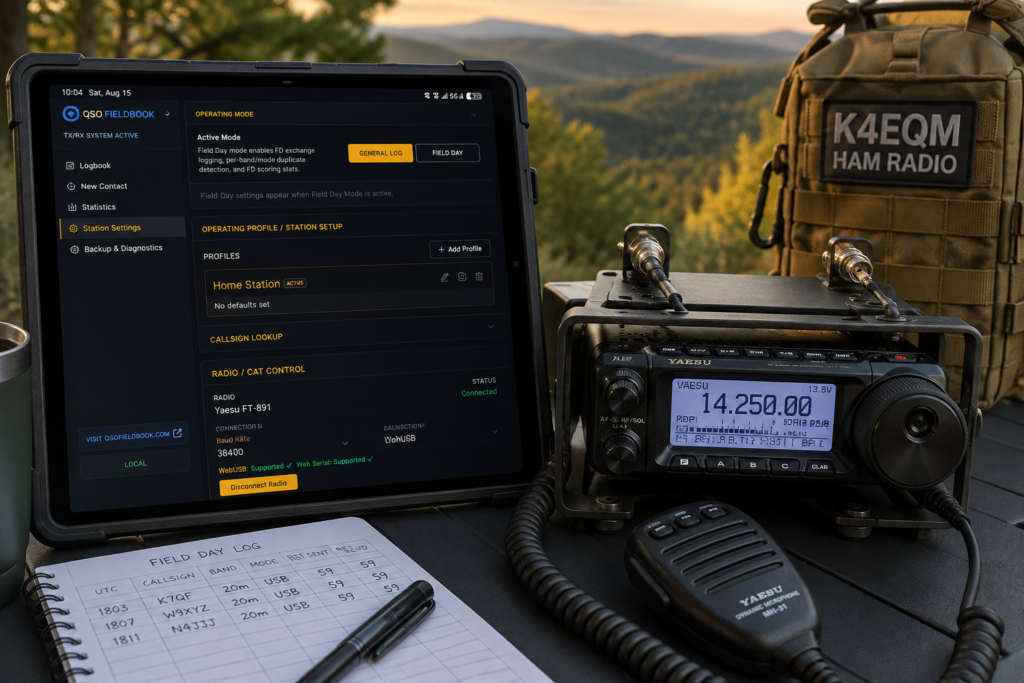
When the radio is connected, QSO Fieldbook can now read the current frequency and operating mode directly from the radio. From there, the app also figures out the band automatically.
So if I’m sitting on 14.250 MHz in USB, QSO Fieldbook already knows I’m on 20 meters and can fill that information into the New Contact form for me.
As I turn the VFO, the frequency in QSO Fieldbook follows along.
If I change bands, it follows that too.
If I switch modes, the mode in the log changes with the radio.
It sounds like a small thing, but when you’re actually operating, it makes the logging process feel a lot more natural.
Instead of entering information the radio already knows, I can focus on the contact.
CAT Control Without Giving Up Manual Logging
One thing I did not want was for CAT control to become a requirement.
QSO Fieldbook is still completely usable without a radio connected.
If I unplug the radio, turn it off, or just don’t want to use CAT, I can enter everything manually exactly like before.
There’s also a little bit of intelligence built into the New Contact form.
If the radio is connected and I manually change the frequency, band, or mode for a particular contact, QSO Fieldbook won’t immediately overwrite what I typed the next time it polls the radio.
There’s also a Sync From Radio button if I want to pull the current radio settings back into the form.
Once the QSO is saved, the next contact can go right back to following the radio.
That balance was important to me. The radio should help with logging, not take control of it.
Getting QSO Fieldbook CAT Control Working on Android
This part ended up being the rabbit hole.
My main portable device is an Android tablet running Android 16. My first thought was to use Web Serial because QSO Fieldbook is primarily a web app and PWA.
The basic CAT system worked, but Android 16 would not expose the FT-891’s USB serial interface to Chrome the way I needed it to.
So instead of giving up on the tablet, I went another direction.
I added a native Android USB connection to QSO Fieldbook.
The Android version can now talk directly to the radio through Android’s USB Host system. The radio connects to the tablet through a USB hub, and QSO Fieldbook sees the FT-891’s Silicon Labs CP2105 USB interface directly.
That also gave me a chance to see exactly what the FT-891 presents over USB.
It exposes two interfaces:
- Enhanced COM Port — used for CAT control
- Standard COM Port — used for things like PTT and transmit control
QSO Fieldbook only uses the Enhanced CAT interface.
I intentionally left the transmit-control side alone. Right now the goal is simple: let the logger read what the radio is doing.
Then I Wanted the PWA to Work Too
Once the Android app was working, I still wasn’t completely satisfied.
One of the things I like about QSO Fieldbook is that it can just be opened in a browser or installed as a PWA. I didn’t really want QSO Fieldbook CAT control to mean everyone suddenly needed a traditional Android app.
So I went back after the browser side again.
The solution ended up being WebUSB.
Instead of asking Android to expose the FT-891 as a traditional serial port, QSO Fieldbook can connect directly to the radio’s USB interface from Chrome.
And that worked.
So at this point, on my tablet, I can use the FT-891 with QSO Fieldbook three different ways:
- The native Android app
- The installed PWA
- QSO Fieldbook opened normally in Chrome
All three can read the radio.
That was probably the part of this update I was happiest to get working.
A Small FT-891 Setting That Caused a Big Headache
There was one FT-891 setting that had me scratching my head for a while.
The USB connection was working. QSO Fieldbook could see the radio. It could identify the correct CAT port. Everything looked like it should be working.
But I wasn’t getting frequency data.
The culprit ended up being CAT RTS.
My radio had CAT RTS enabled, while QSO Fieldbook was intentionally leaving RTS off.
Once I changed:
CAT RTS: Disabled
the frequency immediately started coming through.
My current working FT-891 setup is:
CAT Rate: 38400
CAT RTS: Disabled
Sometimes the fix really is one menu setting.
What QSO Fieldbook CAT Control Feels Like in the Field
This is really the part that matters.
I can set the tablet next to the FT-891, connect one USB cable, open QSO Fieldbook and start operating.
If I tune from one frequency to another, the logger follows me.
If I change modes, the logger follows me.
When I open a new QSO, frequency, band and mode can already be filled in.
I type the callsign and the actual contact information instead of repeatedly entering details that are already available from the radio.
That’s much closer to how I pictured QSO Fieldbook working when I started building it.
One CAT System Across Multiple Platforms
I also didn’t want to build three separate versions of the CAT system.
The FT-891 logic is shared.
The frequency parsing is shared.
The mode handling is shared.
The logging behavior is shared.
The difference is simply how QSO Fieldbook reaches the radio.
The Android app can use native USB.
The PWA and normal Chrome version can use WebUSB.
On platforms where traditional Web Serial works well, that option is still there too.
That should make it much easier to support more radios later without tearing apart the logging side of the app every time.
What’s Next for QSO Fieldbook?
For the moment, I’m actually trying not to add much more to CAT.
It works.
Now I want to use it.
There are some things that only real operating time is going to tell me, like how it behaves during a long session, what happens after the tablet sleeps and wakes back up, how reconnecting USB feels in normal use, and whether there are little workflow annoyances that don’t show up during development.
The FT-891 is the first radio supported, but the system was built with additional radios in mind.
I’m sure that will come later.
For now, though, I’m pretty happy with where this landed.
A couple of days ago I was wondering whether QSO Fieldbook could simply read the frequency from my radio.
Now I can plug the FT-891 into my Android tablet, open QSO Fieldbook in the app, PWA, or browser, and have the log follow along with the radio.
That feels like a pretty big step forward for the project.
If you want to follow along as QSO Fieldbook continues to develop, you can find the latest work on the QSO Fieldbook Updates page.
QSO Fieldbook is still under active development and testing, and there’s plenty more I want to do with it.